AI APP BUILDER COMPARISON · 2026
Xroga vs Bolt.new: Which AI Builder Should Take Your Idea Further?
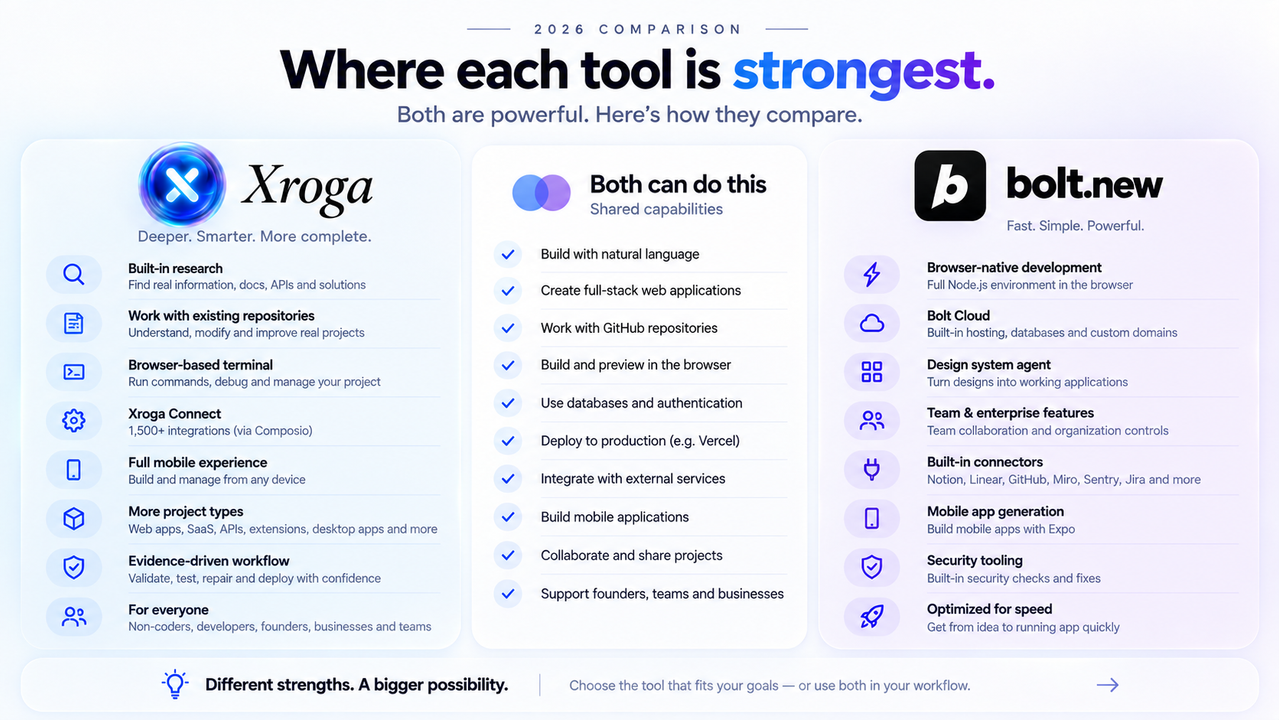
Both products can turn plain-language ideas into software. The more useful comparison is what happens after the first code appears: research, repository work, testing, connected tools, infrastructure, ownership, and the evidence behind a release.
The 30-second answer
Bolt is excellent at the browser-first build loop. Xroga is designed to keep more of the product journey connected.
Bolt.new is a strong choice when you want a JavaScript-first application environment that lives almost entirely in the browser. Bolt combines code generation with a live runtime, GitHub synchronization, databases, authentication, hosting, domains, connectors, and other infrastructure through Bolt Cloud. Bolt v2
Xroga is designed for projects where the work extends beyond the initial generation loop: current web research, an existing repository, broader project types, explicit validation, repair, connected external tools, responsive workspace access, GitHub ownership, and deployment evidence through providers the user authorizes.
If the integrated browser runtime is the main product you are choosing, Bolt is compelling. If the workflow around the software matters just as much as generation, Xroga has the broader fit.
01 · SIDE BY SIDE
Xroga vs Bolt.new at a glance
This table does not use a fake winner badge. A shared capability is shown as shared. A Bolt strength stays a Bolt strength. An Xroga advantage is called out only where there is a concrete workflow difference.
| Capability | Xroga | Bolt.new | Why it matters |
|---|---|---|---|
| Build from plain language | Yes | Yes | Both products are designed around natural-language software creation. |
| Browser-based workspace | Yes | Yes — a major strength | Bolt is especially strong at running a JavaScript application directly inside its browser development environment. |
| Existing GitHub repositories | Yes | Yes | Bolt now supports importing existing GitHub repositories, so this is a shared capability. |
| GitHub branch / sync workflow | Repository-aware branches and reviewable work | Two-way Git sync | Bolt has a particularly polished documented two-way GitHub synchronization flow. |
| Current web research during product work | Built into the workflow | No equivalent first-class research workflow found in the reviewed Bolt product docs | Xroga can use current public sources and API/provider research as implementation context. |
| Backend language breadth | Repository-oriented across multiple supported stacks | JavaScript / Node.js backend focus | Bolt currently says PHP and Python backends are not compatible with its builder. |
| Builder on mobile browsers | Responsive desktop, tablet and phone workspace | Mobile browsers not fully supported | Bolt currently recommends desktop Chromium-based browsers for building. |
| Mobile application projects | Supported project workflows | Expo-compatible projects | Both can participate in mobile-app project creation. |
| Database and authentication | Supported provider/project workflows | Bolt Cloud + external provider options | Bolt has the more integrated first-party cloud experience here. |
| Built-in hosting | Deploy through supported authorised providers | Bolt Cloud | Bolt has the stronger all-in-one native hosting story. |
| Browser/runtime verification | Explicit checks, evidence and blockers | Runs, tests, debugs and iterates | Both go beyond static code generation; Xroga makes generated, validated and deployed states especially explicit. |
| External services | Xroga Connect | Bolt Connectors | Both support connected services. Xroga additionally emphasizes permission boundaries around consequential actions. |
| Browser extensions | Dedicated workflow | Not documented as a first-class output in the reviewed product pages | Xroga exposes browser-extension work as a distinct product path. |
| Desktop software | Electron-oriented workflow | Not documented as a first-class output in the reviewed product pages | Xroga explicitly supports desktop-software project workflows. |
| Dedicated design-system product | Uses repository/project design patterns | Design System Agents | Bolt has the clearer dedicated design-system ingestion product today. |
| Team / enterprise administration | Not the strongest current self-serve area | Teams and enterprise controls | Bolt currently has the stronger documented administration story. |
Bolt's current support documentation explicitly says mobile browsers are not fully supported and that Bolt only supports JavaScript-based backends such as Node.js; PHP and Python backends are not compatible with the builder. Bolt supported technologies
02 · BOLT'S STRENGTHS
What Bolt genuinely does well
Bolt should not be reduced to a prototype generator. Its current product is considerably more mature: Bolt v2 combines browser-based AI coding with hosting, databases, authentication, payments, security tooling, SEO features, GitHub workflows, and team capabilities. Bolt v2 product overview
Browser-native development
Bolt's immediate browser runtime is one of its clearest product advantages. It reduces environment setup and keeps generation, execution, and iteration close together.
Bolt Cloud
Hosting, domains, databases, and authentication can remain inside the same Bolt-managed product experience.
Two-way GitHub sync
Bolt supports importing existing repositories, branches, automatic pushes after runtime checks, and pulling GitHub changes back into Bolt.
GitHub integrationDesign System Agents
Bolt has a dedicated design-system workflow for teams that want agents building from established component systems and brand primitives.
Design System AgentsConnectors
Bolt can connect to tools such as Notion, Linear, GitHub, Miro, Sentry, Context7, Granola, and Jira, with custom remote MCP connectors also supported.
Bolt ConnectorsTeams and enterprise
Bolt currently has the stronger documented team administration story, including centralized billing, access management, provisioning, and enterprise controls.
Bolt pricing03 · XROGA'S BROADER PATH
Xroga's advantage is not “more code generation.” It is more of the software journey staying connected.
Xroga is organized around a product that can survive beyond the first generation. The request, repository, research, implementation, validation, blockers, connected services, and release evidence can remain part of the same project story.
What exists now, not what the model assumes exists.
What actually ran, passed, failed, or reached a provider.
Which external action the user has actually authorized.
Missing credentials, failed checks, or external setup remain visible instead of being converted into success.
That model is especially useful once an AI project stops being a demo and becomes software another person needs to operate, review, or trust.
04 · SAME REQUEST, DIFFERENT PATH
Both can start from plain language. The workflow after that is different.
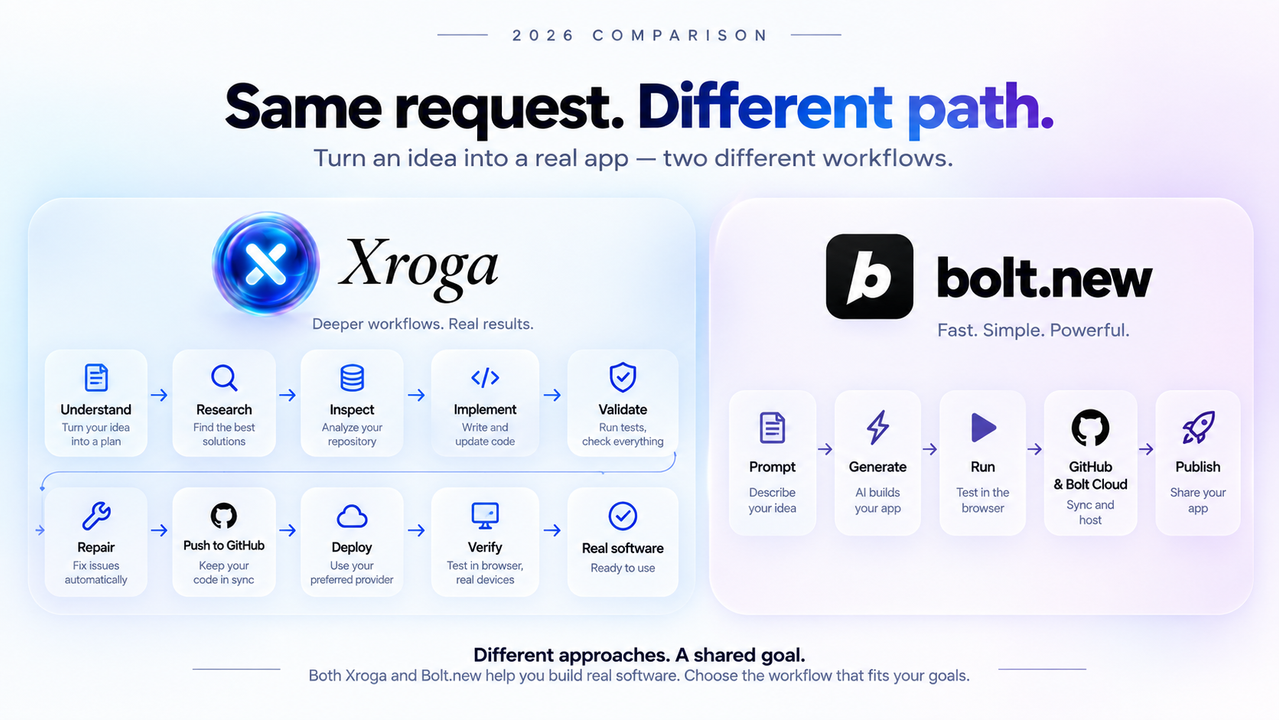
Imagine asking both systems to build a customer portal with authentication, roles, billing, analytics, responsive states, and production deployment.
BOLT-ORIENTED FLOW
Prompt → generate → run → GitHub / Bolt Cloud → publishDeliberately compressed and convenient when your project fits the browser-native JavaScript environment.
XROGA-ORIENTED FLOW
Outcome → understand → research → inspect → implement → validate → repair → GitHub → deploy → verify evidenceMore stages become useful when the job includes an existing project, external systems, or production proof.
05 · REPOSITORIES AND STACKS
Existing repositories are shared. Runtime breadth is where the story diverges.
Older Bolt comparisons sometimes claim Bolt cannot work with existing GitHub repositories. That is outdated. Bolt now documents repository imports and two-way synchronization. Bolt GitHub documentation
The more meaningful difference is runtime scope. Bolt says it focuses on JavaScript-based web technologies, with Node.js for the backend, and explicitly says PHP and Python backends are not compatible with the builder. Supported technologies
Xroga is repository-oriented rather than tied to one browser runtime. That makes it better suited to a wider range of existing project shapes, including supported work across JavaScript, TypeScript, Python, Go, Rust, PHP, Ruby, Java/OpenJDK, Swift, and Kotlin where the project environment allows the relevant checks and execution.
Broader repository orientation is not a promise that every language, dependency, or infrastructure combination will be executable in every environment. Xroga should report the exact validation available for the connected project rather than pretending universal compatibility.
06 · BROWSER WORKSPACE AND MOBILE
Both live in the browser. The device story is different.
BOLT
Desktop browser first
Bolt recommends Chrome or another Chromium-based browser on desktop and currently says mobile browsers are not fully supported.
Browser supportXROGA
Responsive product workspace
Xroga's workspace is designed around responsive desktop, tablet, and phone layouts so users can prompt, follow project state, inspect progress, and handle lighter product work away from a desktop workstation.
A phone is obviously not the ideal place to review a thousand-line diff. The point is access: founders, operators, product managers, and other collaborators are not required to live inside a desktop IDE simply to follow the product.
07 · RESEARCH AND CONNECTED TOOLS
Xroga can research the problem and then work through supported external services.
Software work increasingly depends on information that can change faster than model training data: API documentation, SDK versions, authentication requirements, hosting changes, provider migrations, and platform rules.
Xroga AI Chat can use current public web search and source-backed research when the work depends on fresh information. That research can become implementation context for the connected project. Xroga AI Chat
Xroga Connect
Xroga Connect is the customer-facing integration layer for supported external services. Xroga's product model distinguishes reading/searching from consequential actions that create, edit, send, delete, or publish something. Actual availability depends on the app, provider permissions, authentication, and the action being requested.
Bolt also has a real integration story and should receive credit for it. Bolt Connectors currently include Notion, Linear, GitHub, Miro, Sentry, Context7, Granola, and Jira, with custom remote MCP connectors supported. Bolt Connectors
08 · “DONE” NEEDS PROOF
Generated, validated, and deployed are different states.
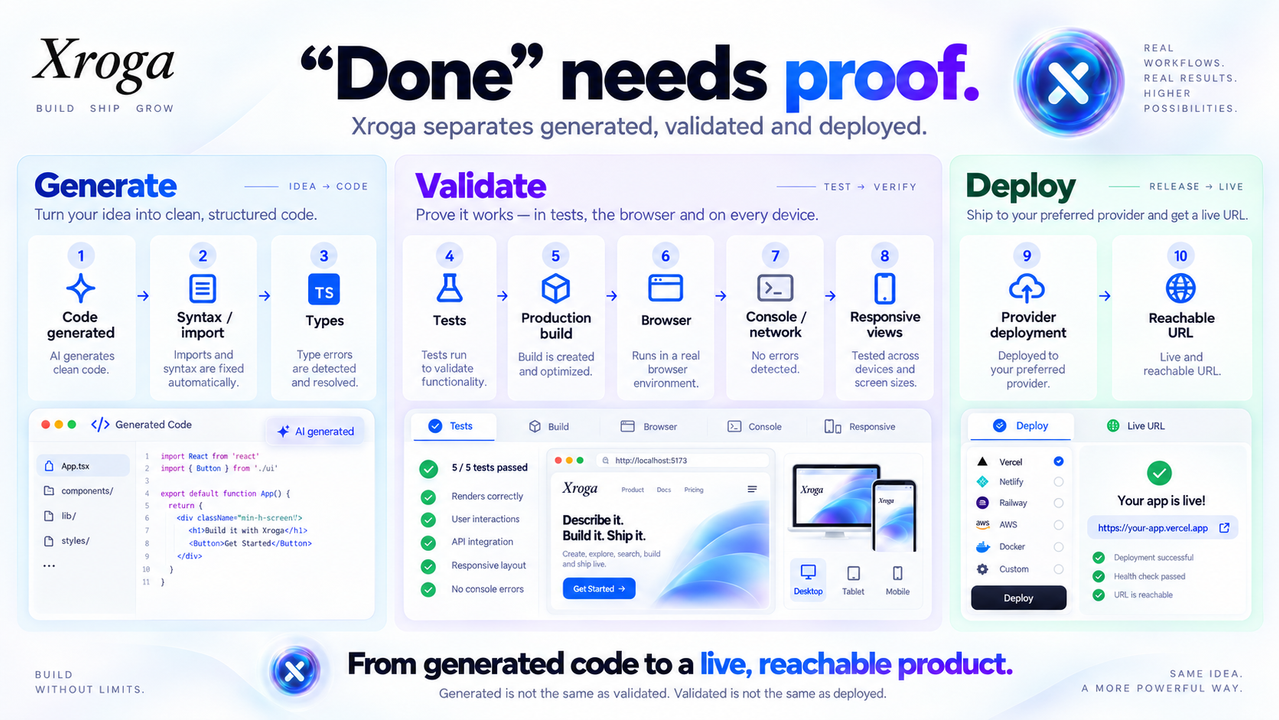
AI coding has a distinctive failure mode: a model can sound confident while the application is still broken. That makes each boundary important.
The requested implementation exists.
The project can resolve the code it was given.
Applicable type validation runs.
Project-defined tests run where available.
Development preview is not substituted for the real build.
The actual product starts and can be inspected.
Runtime and request failures remain visible.
Relevant desktop and mobile states can be reviewed.
The external provider accepts the release.
There is something real another person can open.
This does not mean Bolt does no validation. Bolt explicitly describes automated testing, debugging, iteration, runtime checks, security tooling, and other production-oriented features. The distinction is that Xroga makes evidence, blockers, and completion boundaries a particularly explicit part of the product contract. Bolt product overview
09 · INFRASTRUCTURE AND OWNERSHIP
Bolt's strongest infrastructure advantage is integration. Xroga's is explicit provider ownership and release evidence.
BOLT CLOUD
One integrated environment
- Website hosting
- Custom domains
- Databases
- Authentication
- Security tooling
- Payments
- SEO features
XROGA PROVIDER WORKFLOW
Your accounts stay visible
- GitHub repository ownership
- Vercel through an authorized account
- Supabase project workflows
- Environment configuration
- Build gate before live status
- Provider-backed deployment evidence
- Custom domain / DNS workflows
If you want the fewest infrastructure decisions, Bolt Cloud is attractive. If you want the repository and provider identities to remain independently inspectable, Xroga's model can be a better fit.
10 · WHAT CAN YOU BUILD?
Xroga is positioned beyond one application category.
Both products can build websites, web applications, and mobile-app projects. Xroga additionally exposes dedicated workflows for project types that are not presented as first-class Bolt outputs in the official pages reviewed.
“Not documented as first-class” does not mean another general-purpose AI could never produce code for that output. This page distinguishes a documented product workflow from a theoretical code-generation possibility.
11 · PRICING AND USAGE
Both have a $25 monthly paid entry point. The usage model is different.
XROGA
Xroga describes customer usage as plan capacity rather than exposing a fixed customer-facing prompt, action, or model-token allowance.
Xroga pricingBOLT.NEW
Bolt Free currently lists a 300K-token daily limit and 1M monthly tokens. Pro starts at 10M monthly tokens with no daily token limit. Unused paid tokens can roll into the next month.
Bolt pricingBalanced Month
Xroga can progressively make monthly capacity available through the billing cycle instead of turning usage into an arbitrary “five prompts left” counter.
Full Access — Pro
When the work needs more capacity now, Full Access can make the remaining working capacity for the current cycle available earlier.
Full Access changes when existing capacity becomes available. It does not create additional monthly capacity and should not be described as unlimited or as a free reset.
Token totals and Xroga capacity should not be converted into a fake exchange rate. Different agents use context, models, tool calls, retries, and verification differently. The useful question is how much meaningful project work the plan allows you to complete.
12 · WHO IS XROGA FOR?
One workspace. Different levels of technical depth.
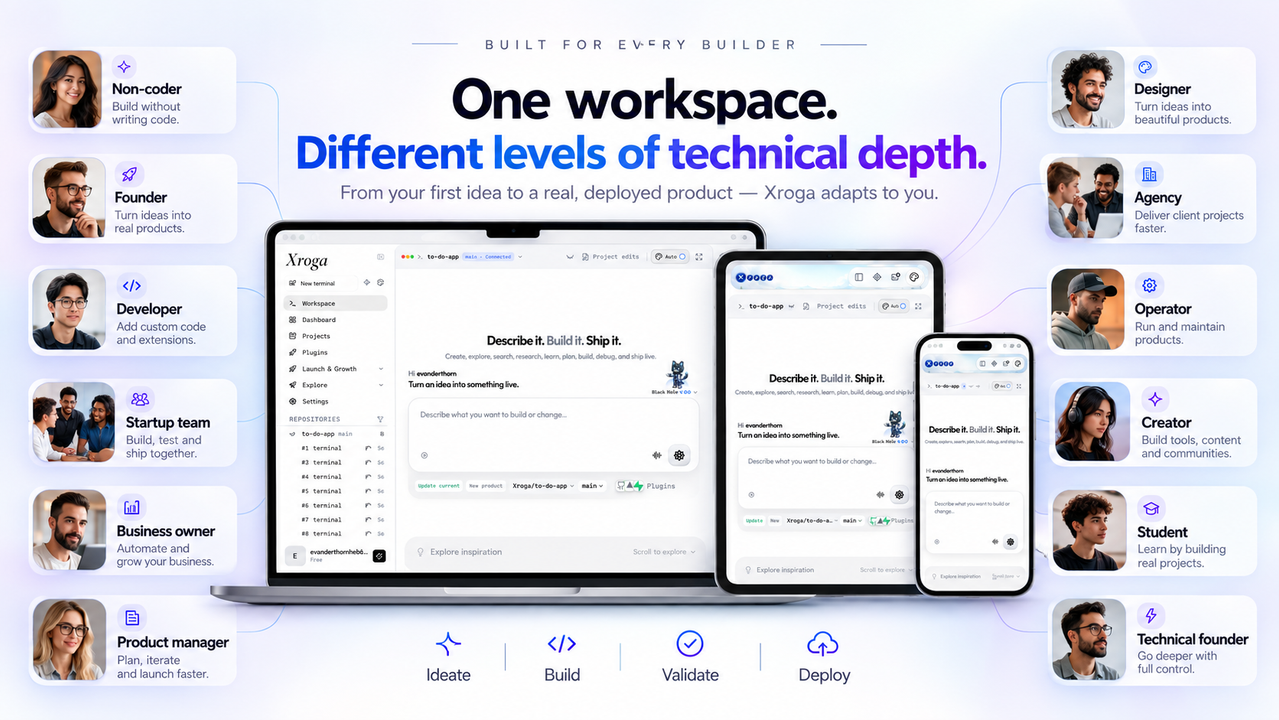
Non-technical founders
Describe the outcome in plain language and follow visible project state without learning a full IDE before you start.
Technical founders
Keep the repository, code changes, terminal-level information, validation, and provider evidence available when deeper control is needed.
Developers
Work against existing repositories and project conventions instead of limiting every project to one hosted runtime.
Startup teams
Move from idea to MVP while preserving a path for the same codebase to survive customer feedback, fixes, and production iteration.
Business owners
Build internal tools, portals, dashboards, automation, and custom operational software around the business process you actually use.
Product managers
Follow intent, implementation progress, blockers, validation, and release state without needing to become the person writing every line.
Designers
Review real responsive behavior and work against the actual product rather than only a static visual mockup.
Agencies and consultants
Work across different client repositories, hosting providers, data systems, and release requirements.
Operators
Use connected tools and automations while keeping consequential external actions tied to authorization.
Creators
Turn an idea into a website, tool, application, extension, automation, or interactive product without starting from infrastructure setup.
Students
Learn through building instead of treating a complete local development toolchain as the admission ticket.
Technical consultants
Diagnose, repair, refactor, and extend existing projects while preserving an inspectable trail of work.
13 · DECISION
Which one should you choose?
CONSIDER BOLT WHEN
The integrated JavaScript browser environment is the main advantage you want.
- You want a fast browser-native Node.js loop.
- Bolt Cloud hosting, database, and auth fit the product.
- Your backend naturally belongs in JavaScript / Node.js.
- Bolt's design-system workflow is important.
- Team and enterprise administration is a primary requirement today.
- You prefer an explicit token-based usage model.
CONSIDER XROGA WHEN
You want the broader path from intent to inspectable software.
- You have an existing repository or a broader stack.
- Current web research should feed directly into implementation.
- Non-coders and developers need one shared product workspace.
- Evidence, blockers, browser checks, and provider state need to stay visible.
- Extensions, desktop software, automation, or other software shapes matter.
- You want repository and deployment-provider ownership to remain explicit.
- Responsive desktop / tablet / phone access matters.
- You prefer a capacity model over prompt/action counters.
THE SIMPLEST DECISION RULE
If the runtime is the product you are choosing, Bolt is compelling.
If the workflow around the software is the product you are choosing, Xroga deserves a closer look.
14 · FAQ
Xroga vs Bolt.new: frequently asked questions
Is Xroga better than Bolt.new?
Not for every project. Bolt is particularly strong for fast JavaScript-first application development in a browser with integrated Bolt Cloud infrastructure. Xroga is a stronger fit when the project benefits from repository-centred engineering, current web research, broader software outputs, explicit verification evidence, responsive workspace access, and deployments through provider accounts the user controls.
What is the best Bolt.new alternative?
That depends on what you want to replace. Xroga is especially relevant when you need existing-repository work, current-source research, broader project types, visible validation and blockers, responsive workspace access, or provider-owned deployment instead of a tightly integrated hosted runtime.
Can Bolt.new import an existing GitHub repository?
Yes. Bolt documents importing existing GitHub repositories, connecting Bolt projects to new private repositories, branch workflows, auto-pushing edits that pass runtime checks, and pulling GitHub changes back into Bolt.
Can Xroga work with an existing repository?
Yes. Existing-repository work is a core Xroga workflow. Xroga can inspect the connected project, make focused changes, run applicable checks, and keep the repository and release state visible.
Can Bolt.new work on mobile browsers?
Bolt currently says mobile browsers are not fully supported and recommends Chrome or another Chromium-based desktop browser for building.
Can Xroga work on mobile?
Xroga uses responsive web layouts across desktop, tablet, and phone. Complex code review is naturally easier on a larger screen, but the workspace is designed to remain accessible across device sizes.
Can Bolt build Python or PHP backends?
Bolt currently documents a JavaScript-based backend environment using Node.js and says PHP and Python backends are not compatible with its builder.
Can Bolt build mobile apps?
Yes. Bolt documents Expo-compatible mobile application projects.
Does Bolt support GitHub?
Yes. Bolt has a two-way GitHub integration that supports imports, branches, automatic pushes after runtime checks, and pulling external GitHub changes back into Bolt.
Does Bolt include hosting?
Yes. Bolt Cloud includes website hosting, and Bolt currently includes hosting and databases in its plans.
Does Xroga include hosting?
Xroga emphasizes publishing through supported provider accounts the user authorizes rather than making Xroga itself the hosting destination. For supported Vercel workflows, Xroga treats a successful production build and provider-backed deployment evidence as separate requirements.
What is Xroga Connect?
Xroga Connect is the customer-facing integration layer for supported external tools and services. Availability depends on the app, credentials, permissions, and Xroga safety controls.
Does Xroga search the web while building?
Yes. Xroga AI Chat can use current public web search and source-backed research when the task depends on fresh external information, and that research can become implementation context for the connected project.
How much does Bolt.new cost in 2026?
Bolt currently lists Free at $0 and Pro starting at $25 per month. Free includes a 300,000-token daily limit and 1 million tokens per month. Pro starts at 10 million monthly tokens with no daily token limit.
How much does Xroga cost?
Xroga currently offers Free at $0 with no card required and Xroga Pro at $25 per month. Xroga describes customer usage as plan capacity rather than publishing a fixed customer-facing prompt, action, or model-token allowance.
What is Xroga Full Access?
Full Access is a Pro pacing option that can make remaining working capacity for the current billing cycle available earlier instead of waiting for later progressive availability. It accelerates existing capacity; it does not create extra monthly capacity.
15 · METHODOLOGY
How this comparison was built
Bolt information was reviewed against current official Bolt pricing, product, GitHub, Connectors, design-system, and supported-technology documentation on September 23, 2026. Xroga capability statements reflect the current Xroga product and repository.
We did not run a controlled benchmark between the two products, so this page does not invent numerical scores for code quality, speed, reliability, or “AI intelligence.”
A useful evaluation is to give both products the same representative project and inspect what they changed, the amount of intervention required, the relevant checks, the failure reporting, the repository ownership, the deployment ownership, and the evidence returned at the end.
Primary external sources
BUILD SOMETHING REAL
Research it. Build it. Test it. Repair it. Ship it.
Start from a new idea or bring the repository you already own. Keep the code, project state, validation, connected tools, and provider evidence in one product workflow.
Your repository · Your accounts · Your product